Introducing Junction Box Utils!
Attention all Waze Map Editors!
I am thrilled to announce the arrival of Junction Box Utils, a powerful new script designed to enhance your experience with Junction Boxes in the Waze Map Editor.
Whether you’re familiar with its predecessor, “Roundabout JB”, or encountering it for the first time, Junction Box Utils offers a host of features to optimize your editing workflow.
Installation
A script manager (for example, Tampermonkey) is required to install this script. After installing the script manager of your choice, use this link to add the script to it.
Streamlined Roundabout Geometry
Say goodbye to unsightly Junction Boxes misaligned with roundabouts. With Junction Box Utils, recreating the precise roundabout shape and seamlessly applying it to the Junction Box is effortless.

Usage:Simply create a new junction box over a roundabout (JuBra) and select “Roundaboutize” from the properties panel.
Effortless Backup and Restore
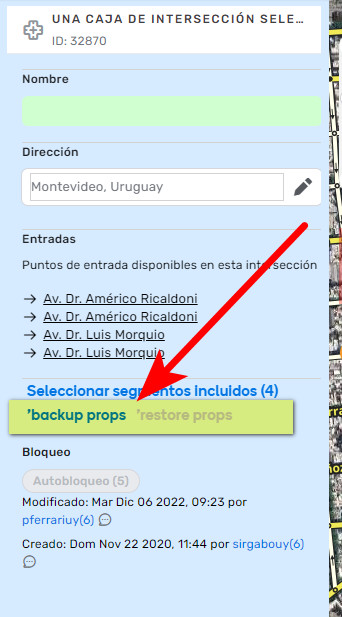
No more manually recreating junction boxes and risking data loss. Junction Box Utils simplifies the process with its intuitive backup and restore feature. Select the junction box to delete, hit “Backup properties”, proceed with deletion, then effortlessly restore all settings — including name, address, turn restrictions, guidance, and lanes — when recreating the junction box. Plus, Backup/Restore isn’t limited to roundabouts — it’s a versatile tool for any junction box.
Usage: Select a junction box to backup its properties via a designated button in the edit panel. Recreate the junction box and use the appropriate button to restore its properties.
Limitations
- Only available if the topology (the segments constructing the junction box) hasn’t been changed. This means you can do whatever you want, except including/excluding segments. Changing the ID (merging/splitting) of those segments will affect the topology as well.
Simplified Roundabout Normalization
Tired of manually adjusting voice prompts for every entry segment? Junction Box Utils streamlines the process into a few-click solution, making normalization or denormalization of roundabouts a breeze.
Usage: Create a Junction Box over Roundabout (JuBRA), select an entry segment, and use the appropriate button from the edit panel to apply the desired action (Normalize/Denormalize). All exits for the selected entry segment will be affected.
Normalize - Apply turn right/left, continue straight, and make U-turn instructions to a roundabout.
Denormalize - Apply “count exits” instructions on a roundabout.
Contribute to Junction Box Utils!
Junction Box Utils is a collaborative effort, and contributions from the Waze Map Editor (WME) community are welcomed.
Here’s how you can get involved:
Translation Efforts
If you’re a user of WME who operates in a language other than English, your expertise is invaluable! Help make Junction Box Utils accessible to more users by becoming a translator.

Feature Suggestions and Feedback
Have ideas for new features or improvements? I’d love to hear from you! Share your suggestions and feedback to help me continue enhancing Junction Box Utils and making it even more valuable for WME editors.
Bug Reports
Encountered a bug or glitch while using Junction Box Utils? Let me know! Your bug reports help me identify and address issues promptly, ensuring a smoother experience for all users.
Credits
Huge thanks to everyone who has made this script possible and better!
Thank you guys, you are awesome!
@P5YDUCK  - As the one who has come up with this idea, without you this script wouldn’t exist
@zeze13 - The number of hours you’ve spent making this script better is invaluable
@linguasaltitante  - Portuguese translations
@cedricvondk  - French translations
@DavidAbarca  - Spanish translations
@JCNina  - Spanish translations
@witoco  - Spanish translations
@Ge1oN  - Ukrainian translations
@TurfTurf  - Italian translations
@Proffa71  - Finnish translations
@voyadexon  - German translations