[Script] WME Tab Manager (v1.4.4)

This userscript augments the Waze Map Editor by providing additional settings concerning the tabs. For example, this script preserves the order of the tabs and reopens the tab you had open the last time you used the WME.

Current features

  • Reopen the tab you had open the last time you used the WME
  • Replace the tab title with an icon of your choosing
  • Hide tabs that you don’t need
  • Recolour the text and background of tabs
  • Adjust the width and height of the tabs
  • Preserve the order of the tabs over sessions
  • Reorder the tabs in any way you like

Installation instructions

> TL;DR: install as most other WME userscripts from its Greasy Fork page

Userscripts are snippets of code that are executed after the loading of certain webpages. This script does this after the loading of the Waze Map Editor. In order to run userscripts in your browser, you are adviced to use Firefox or Google Chrome.

You will need to install an add-on that manages userscripts for this to work. There’s TamperMonkey for Firefox and Chrome.

These add-ons will be visible in the browser with an additional button that is visible to the right of the address bar. Through this button it will be possible to maintain any userscripts you install.

For WME Tab Manager, you should be able to install the script at Greasy Fork. There will be a big green install button which you will have to press to install the script.
When installing userscripts always pay attention to the site(s) on which the script runs. This script only runs on Waze.com, so other sites will not be affected in any way.

After installing a userscript, you will be able to find it working on the site(s) specified. Do note that if you had the page open before installing the userscript, you will first need to refresh the page.

TamperMonkey will occasionally check for new versions of these scripts. You will get a notification when a new version has been found and installed.

How to use
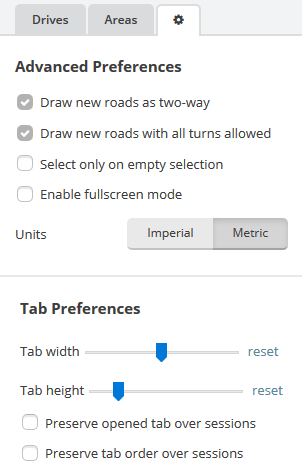
The script adds additional options to the preferences tab. These options allow you to enable or disable the script’s features:

  • ‘Tab width & Tab height’: adjust the width and height of all tabs so they take up less/more space than before.
  • ‘Preserve opened tab over sessions’: have the script reopen the tab you had selected during the last time you used the WME.
  • ‘Preserve tab order over sessions’: have the script rearrange the tabs to preserve the previous order when loading the WME. New tabs are added to the back. When selecting this option, an additional menu appears that allows you to manage the tabs further in detail.
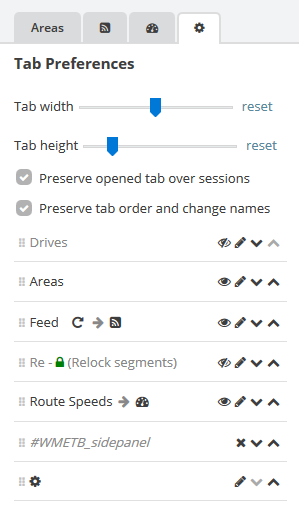
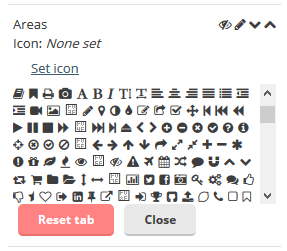
When the tab order is preserved over sessions it also becomes possible to hide tabs or replace the tab name with an icon.
Feedback and suggestions

I maintain a list of ‘issues’ I may want to work on at the GitHub project page. If you are experienced with GitHub, feel free to post it there, otherwise I’ll gladly discuss things in here.

2 Likes

The next couple of features I’ll be working on are:

  • Hiding a tab
  • Changing the name of a tab
    Any other ideas on how the tabs can be improved are most certainly welcome!
    I’m currently thinking of how I can make it easier to move the tabs around and how to make many tabs take up less space.

Thanks a lot !

Will the renaming also let us choose an icon, like in your suggestion here ?

I’m currently thinking of allowing people to enter some text or an icon as a replacement. I still have to figure out a nice way of getting and presenting all these icons, but that shouldn’t be too hard :slight_smile:

1 Like

Woohoo!

It took me a week or two more than expected, but version 1.0 has been released!

This release makes the userscript a lot more interesting as it is now possible to:

  • Adjust the width and height of the tabs
  • Hide tabs you don’t need
  • Replace the tab text completely with an icon

I’m aware of the several icons that are invalid in the list, a lot of these missing icons are currently only available in the beta version of the WME or will only be available in the next version of the symbol font used in Waze (FontAwesome).

Next up I’ll be working on another script, so apart from any bugfixes I most likely won’t be adding any new features soon.

1 Like

Thank you :smiley:

I can’t see the settings in my settings tab… I only have the native WME settings, hardhats and validator in there. :?

Both in beta and prod.

I should’ve tested it on Chrome as well… Apparently Chrome doesn’t support the let statement yet in JavaScript, causing it to fail. Il’l have to try to find a way around that.

Turned out that the fix was quite easy: when I enabled strict mode for JavaScript, let is supported in Chrome. It would have been a bit more complex to do that piece of code with var, so I’m happy there was that option. (v1.0.1)
Next to that, I’ve also noticed that the reset buttons next to the tab size sliders didn’t fully work as Google Chrome didn’t allow for an InputEvent to be constructed (even though it’s the only correct event to trigger for range inputs). Luckily I found an even simpler solution to the code I was trying to fix. (v1.0.2)

1 Like

\o/ I see it now !

Renaming tabs etc is working very well and looks very cool.

It seems to be conflicting with UROverview Plus (URO+) and WME Maximized, because I couldn’t get the width and height settings to work properly with those scripts on. When I had them off it worked perfectly though :slight_smile:

Thanks for testing it with those other userscripts! I personally don’t have them running, so I wasn’t aware they’d override the width of the tabs.

URO+ will set the padding of tabs to 4px each second and there is no option to disable this, sadly enough. I could easily catch the change and revert it without it ever being visible, but I’d rather not start fighting other userscripts. I’ll ask the author to make this a setting in the misc tab instead of just applying it all the time.

As for WME Maximized: I didn’t think anyone would apply those CSS rules with the !important option as generally this shouldn’t be necessary if you are adequately specific in your selectors. I’ve now applied the !important option as well and override the rule set in those styles. At the same time I made my script play more nicely by not adjusting the tab size if nothing has been configured in the preferences (or both values have been reset). (v1.0.3)

1 Like

Hipska notified me via Slack that on Google Chrome the tabs sometimes didn’t start completely on the left whenever there was a tab with its name replaced by an icon on the row above. This has been fixed in version 1.0.4.

I’m using v1.0.4 and WME Tab Prefs won’t startup at all. My console gives me the following error (running Chrome Version 47.0.2526.106 (64-bit) on Mac OS 10.10.5:

Syntax error @ 'WME Tab Preferences'!
##########################
JSHINT output:
script: (W087) Forgotten 'debugger' statement on line: 1 at character: 1
script: (W030) Expected an assignment or function call and instead saw an expression on line: 14 at character: 1
script: (W069) ['en_GB'] is better written in dot notation on line: 98 at character: 15
script: (W004) 'i' is already defined on line: 326 at character: 18
script: (W104) 'let' is available in ES6 (use esnext option) or Mozilla JS extensions (use moz) on line: 582 at character: 14
##########################

SyntaxError: Block-scoped declarations (let, const, function, class) not yet supported outside strict mode
    at Function (native)
    at c (<anonymous>:41:115)
    at eval (eval at <anonymous> (unknown source), <anonymous>:1:25)
    at eval (native)
    at n (<anonymous>:72:175)
    at ja (<anonymous>:41:158)
    at ma (<anonymous>:83:93)
    at b (<anonymous>:83:318)

That is very weird as I’ve specifically put “use strict”; before the first line of code to enable strict mode for the “let” statement.
Based on the output, I think you’re using Google Chrome?

yeah, I’m using Google Chrome 47. I’ve had some trouble with strict mode in the past that I can’t quite pin down.

Heh. That’s when cutting edge becomes bleeding edge. I’ve changed the ‘let’ statement for which I enabled strict mode in version 1.0.5. Now the script uses a regular var and lets each element store its value in its dataset. I would have preferred to just use the variable that is already declared in the loop, but the scope of a var doesn’t allow for that to work.

Hey :wink:

The script is still working great despite the WME update, however I tried applying a custom icon to the “Feed” tab, and when I did that I lost the clickable ‘reload’ symbol which is next to the the word “Feed” to refresh the tab.

Would it be possible to either:

  1. Keep it? (custom icon + clickable reload icon)
    or
  2. Keep only the clickable reload icon as a tab icon?

Thanks if you have time to look into it :slight_smile:

Yep, that’s the advantage of having access to the beta version of the WME :slight_smile:

I had already noticed the issue with the feed tab as well. It’s probably not too hard to make an exception for the Waze feed refresh action, so I’ll try to look into that soon.
As for keeping only the refresh icon: I think that could come with the “text replacement” function I still want to add to this script. That way it would be possible to replace the tab with no text.

1 Like

Finally got around to installing this, nice work :slight_smile:

Some ideas for future enhancements that came to mind:

  • option to colour-code the unselected tab backgrounds to help visually group tabs by type
  • include option of adding mouse-over tooltips to the tabs to remind us what the original tab text was, just in case we forget what the replacement icons/text now represent… URMPT already provides this natively now that it’s switched to using its own FA icon in place of tab text, and it’d be nice to replicate this across all other tabs.
  • provide some means of importing/exporting script settings (e.g. via plaintext strings a la URO+) so we can maintain consistent tab settings across multiple browsers or between WME prod and beta

Regards,
Chris

Thanks for the suggestions! I’ll look into them soon. Especially the import/export could be handy indeed.